
Target Account Lists in OMRviewer
Monitor target account lists in OMRviewer to track ideal customer profiles, analyze buying signals, and align your account-based marketing strategy
Strategic Target Account Lists: Focus on Your Dream Customers
Learn how to use target account lists in OMRviewer to keep a close eye on exactly the companies that matter most to your business. Analyze their buying signals and align your marketing and sales efforts precisely toward them.
What you'll find in this article 👇
-
What is a target account list?
-
What benefits do target account lists offer?
-
How to create and use your target account list
-
How to use your target account list
-
Best Practice: How a CRM startup wins enterprise customers
What is a Target Account List?
With target account lists, you can use OMRviewer to keep track of exactly the companies that matter most to you. Instead of analyzing all visitor activities, you create your own list with strategically relevant accounts and see at a glance whether and when these companies were active on OMR Reviews.
A target account list is essentially a custom list of companies you want to keep a close eye on. This could include, for example:
-
Companies that fit your ideal customer profile (ICP)
-
Important accounts from your current sales pipeline
-
Target companies in an ongoing marketing campaign
With target account lists, you put your dream companies in the spotlight, track their activities, and strategically plan and prioritize your marketing and sales efforts.
This is how OMR Viewer supports your account-based marketing (ABM) strategy: Instead of using broad-based tactics, you focus on clearly defined dream customers and ensure that your activities are precisely aligned with them.
Account-Based Marketing (ABM) is a strategic approach where marketing and sales activities are aligned with clearly defined target companies (accounts). Instead of targeting broad audiences, ABM relies on individual, highly personalized campaigns tailored exactly to the needs and decision-making processes of the target companies. In short: focus instead of spray and pray.
What benefits do target account lists offer?
🔍 Focus instead of chance
You concentrate on the accounts that hold the greatest value for your business and don't waste resources on anonymous reach.
🔔 Detect buying signals early
You see when your target accounts start exploring software solutions like yours, often long before they actively reach out to you.
📊 Shared data foundation for marketing and sales
Your marketing team can use target account lists for targeted campaigns, while your sales team keeps the same accounts in view and can respond directly to warm signals.
🎯 Measurable success:
You see in real-time which accounts are active and get a clear, measurable hit rate instead of guessing in the dark whether your efforts are working.
With target account lists, you no longer work reactively. Instead, you steer marketing and sales strategically, data-driven, and efficiently.
How to create and use your target account list
Don't worry, creating a list is super easy. Just follow these steps:
1. Define your target account list
First, think about which accounts you want to monitor. Typical use cases include:
-
"Top 50 enterprise customers"
-
"Accounts from LinkedIn campaign Q3"
-
"Most important pipeline deals greater than 50k euros"
2. Create your target account list in OMRviewer
-
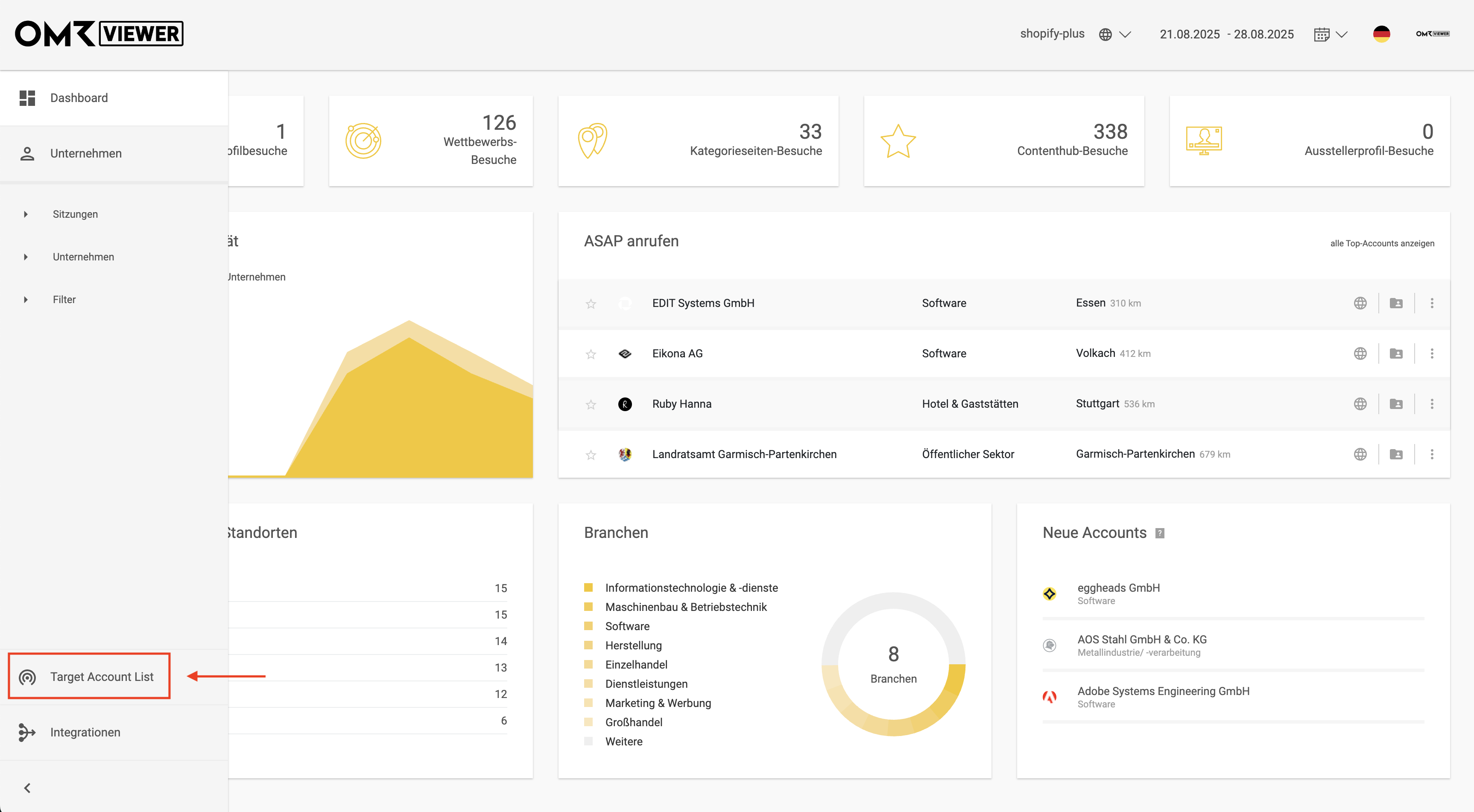
Click on "Target Account List" in the left menu bar in OMRviewer.
-1)
-
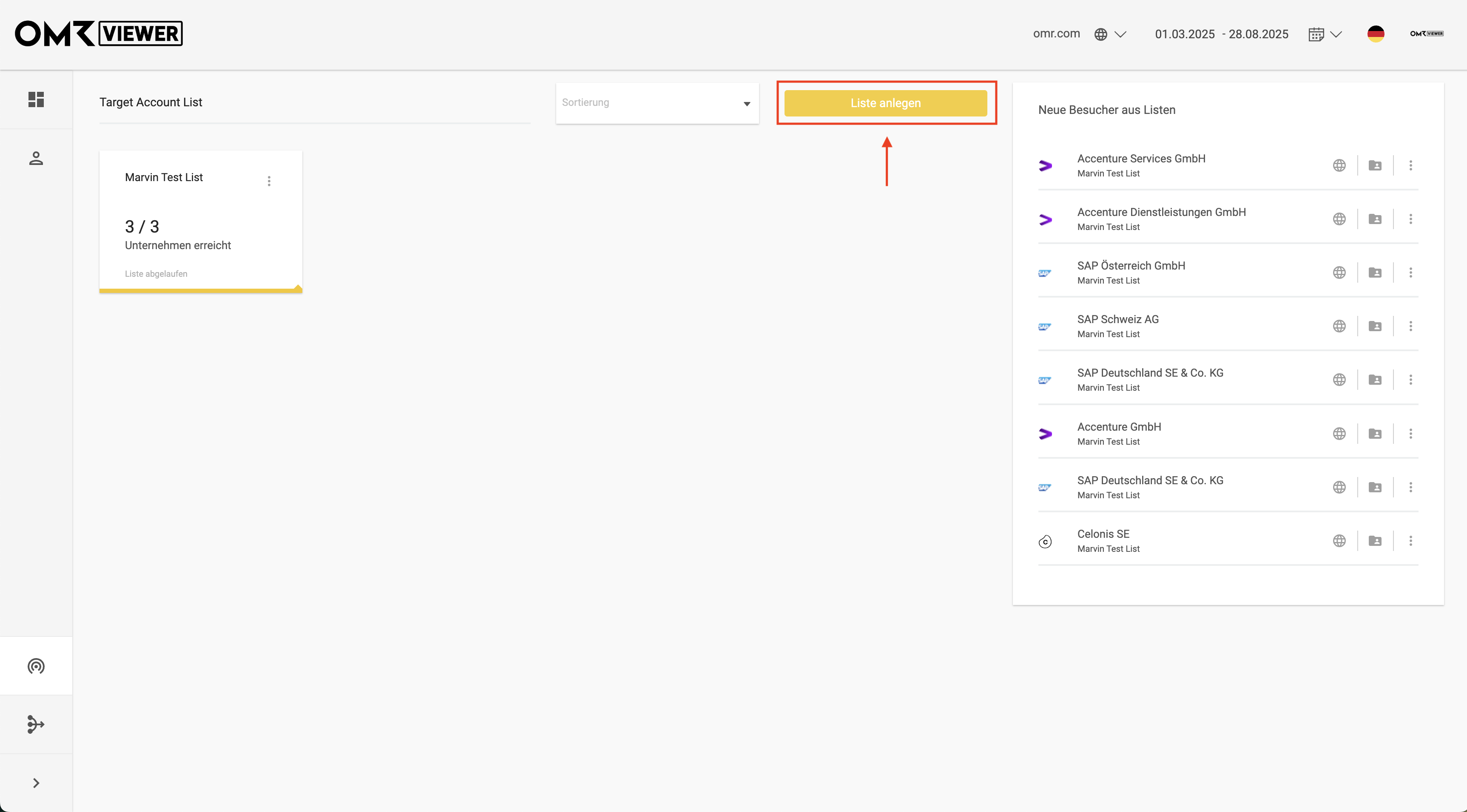
Click the "Create List" button.
-1)
-
Give your list a meaningful name.
-
When you create a new target account list, you can define a start and end date.
-
Start date: From this point on, OMRviewer will start tracking the activities of your accounts in the list. The start date can be at most 1 year in the past.
-
End date: After the end date, the list will no longer be updated. However, you can still view it in the archive.
-
What's the point of this?
-
Campaign measurement
If you're running a specific campaign (e.g., LinkedIn ads in June), you can track your target account list for exactly that time period. This way you'll see directly which of your dream customers were activated.
-
Quarterly or annual targets
Many sales teams work in quarters. With the end date, you can clearly measure your hit rate at the end of a quarter (e.g., "How many accounts from my Q3 pipeline were active?").
-
Comparability
With clear time periods, you can compare different lists more easily, such as campaign A vs. campaign B.
-
-
-
Enter the company names manually and confirm each with Return/Enter, or copy an entire Excel column - the companies will be recognized automatically.
-
Start small and focused
For most teams, 25-100 companies per list makes sense.
This way you can still follow activities in detail and actually make use of them. -
Segmentation instead of massive lists
Even if you have several hundred accounts to track, it's better to distribute them across multiple lists, for example: -
"Enterprise customers DACH region"
-
"Pipeline Q4 greater than 50k"
-
"DACH accounts from LinkedIn campaign"
-
Targeted work
The clearer your list is, the better you can measure campaigns and align sales accordingly. A list with 500+ accounts is technically possible, but quickly becomes unwieldy and loses its added value.
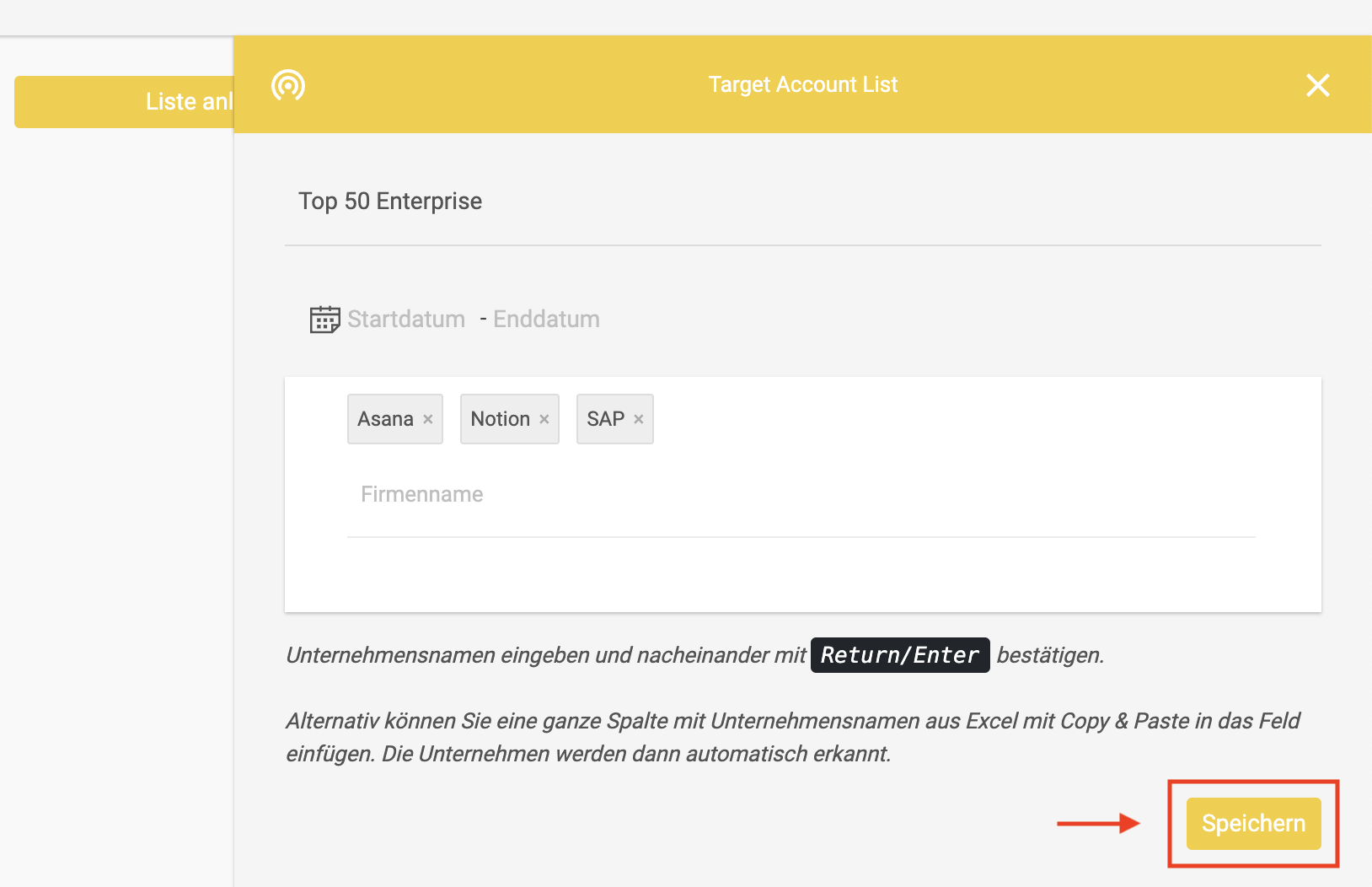
- Click "Save" - and you're done! Your target account list now appears in the overview.
How to use your target account list
Monitor activities in your target account list
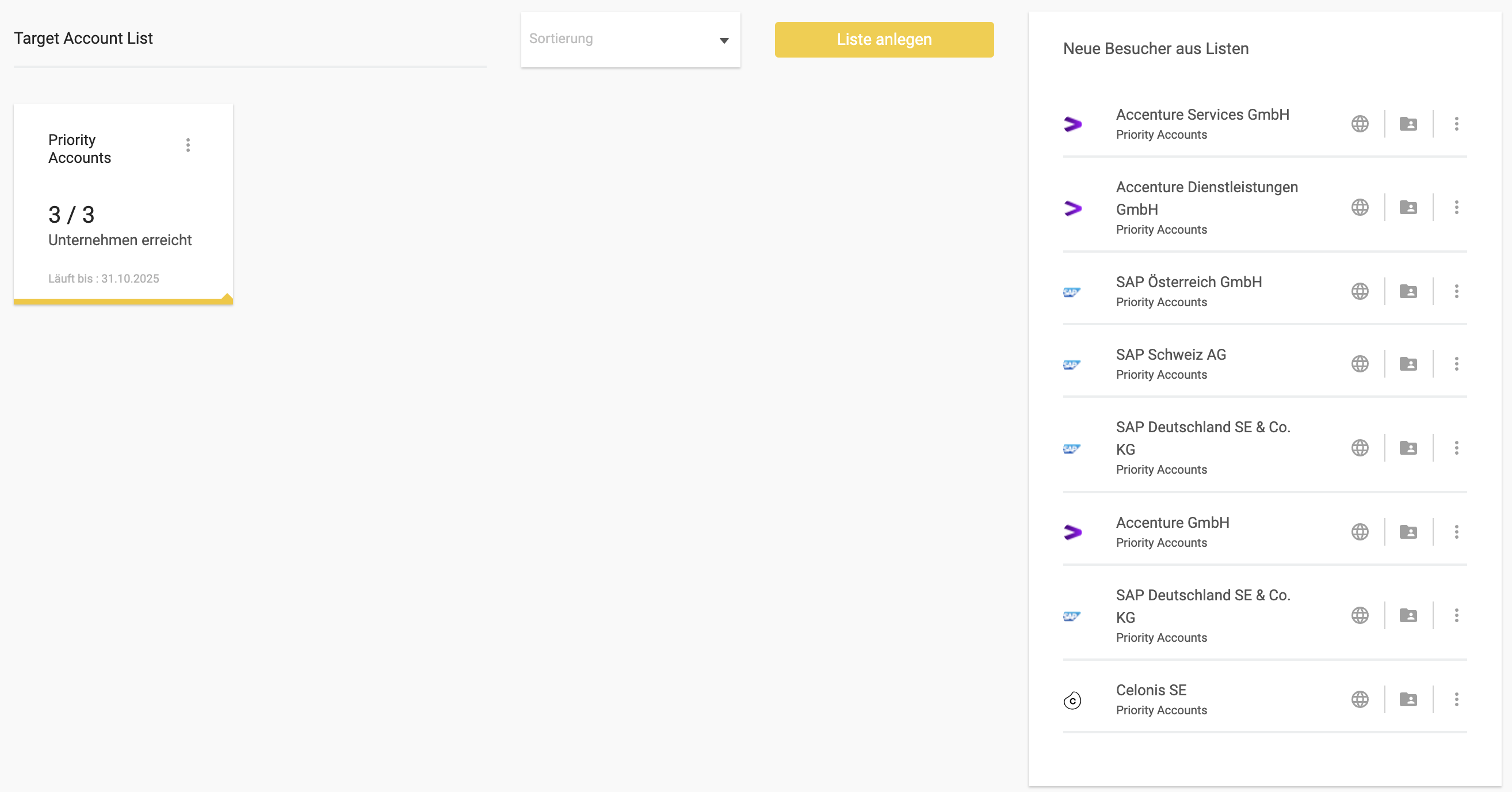
In the overview, you can immediately see how many accounts from your target account lists have already been reached (e.g., 3 of 3) and what new activities your target companies are showing.
-1)
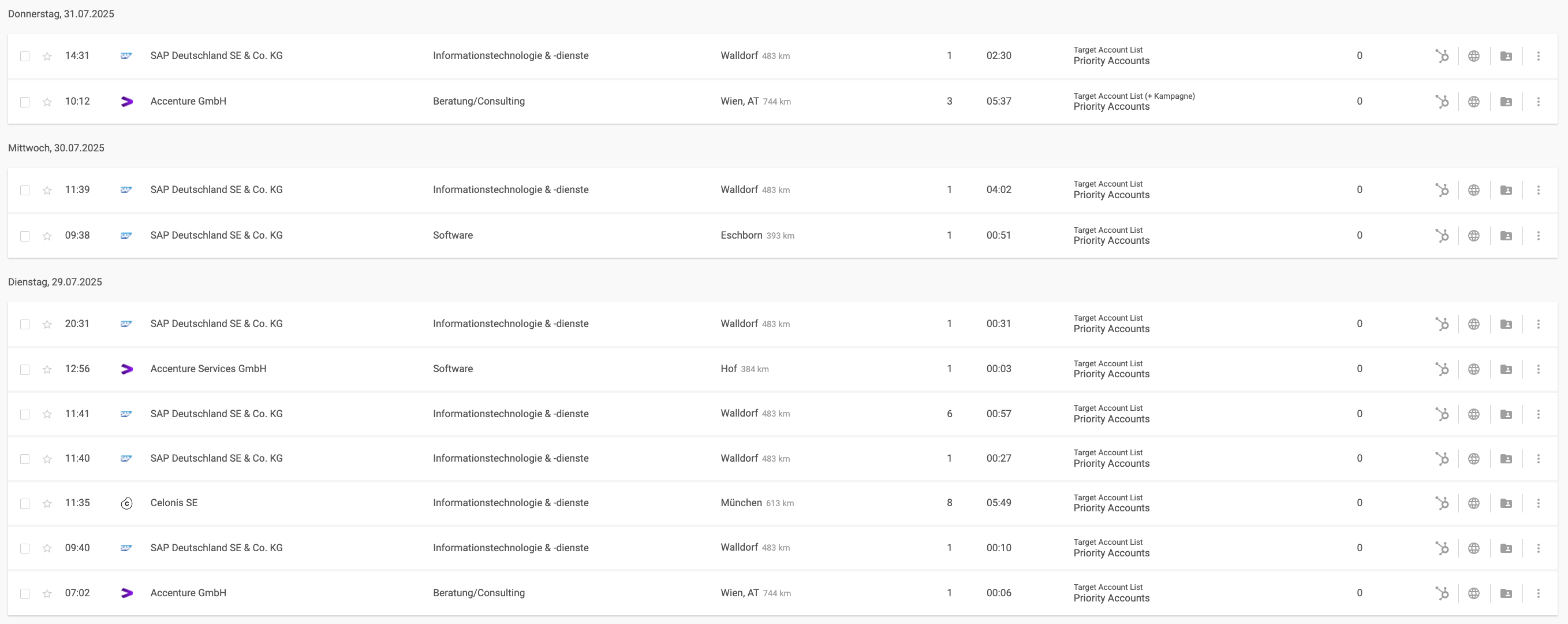
Analyze activities in your target account list
Click on your target account list to open the detailed activity overview. There you can understand:
-
How many target accounts from your list have been reached
-
Which companies were active (including industry, location, distance)
-
When the companies were active (date and time)
-
Which pages the companies visited and for how long (pages and duration)
-
Where the company activities came from (source; e.g., target account list plus campaign)
-
What intent score (strength of purchase interest) the companies have
This way you don't just see that a company was active, but also how intensely and what content they consumed. With this information, you can address your target accounts precisely, according to their needs, and in a personalized manner.
)
Derive actions and implement them
The insights from your target account lists provide the ideal foundation for aligning marketing and sales activities. Use the OMRviewer integration to sync activities directly with your CRM (e.g., HubSpot, Salesforce, or Pipedrive).
📣 For your marketing team: Launch tailored campaigns and optimize content
Use activity data for targeted retargeting: reach only the accounts currently showing interest and reduce wasted spend. Do you notice that an account is intensively exploring a particular topic or competitor profile? Then deliver the content that's relevant right now.
💼 For your sales team: Personalize your outreach at the right time
Instead of cold outreach, you start conversations with real, needs-based touchpoints. Reach out precisely when your target customers' interest is greatest.
🤝 For collaboration: Create a shared data foundation
Marketing and sales work with the same warm buying signals. This allows you to set priorities together and concentrate your resources on accounts with the highest potential. Data is directly turned into targeted actions and your chances of successful deals increase significantly.
Best Practices
How a CRM startup wins enterprise customers
An up-and-coming CRM startup wants to grow in the enterprise segment. Until now, it was unclear whether large target companies showed any interest in their solution.
Here's how the team approaches target account lists:
-
Create target account list
The marketing team creates a list of 50 strategically important enterprise target accounts in OMRviewer. -
Track and analyze activities
After a few weeks, the overview shows: 12 of these accounts were active, some even on the profiles of direct competitors. -
Sync OMRviewer data
Thanks to the OMRviewer integration (e.g., for HubSpot or Salesforce), these valuable insights are automatically transferred to the CRM. -
Align marketing and sales activities
The sales team focuses exclusively on these 12 warm, active accounts and launches a personalized outreach. In parallel, marketing steers additional campaigns to activate more accounts on the list. -
Measure success
After three months, the hit rate shows: 27 of 50 target accounts were active, meaning more than half of the target accounts.
Instead of blindly prospecting, the entire team works on the basis of the same data and focuses on accounts that signal genuine buying interest.
How a software provider keeps track of existing customers
A SaaS provider not only wants to win new customers but also provide closer support to existing accounts. Often it's unclear whether customers actually use certain features or whether they're already looking for alternatives.
Here's how the team approaches target account lists:
-
Create list with existing customers
The customer success team creates a target account list with all enterprise existing customers.
-
Monitor activities
In the overview, it stands out: Some customers are looking at competitor profiles (available from Professional tier) or researching additional categories.
-
Act before things get critical
-
If customers check out competitors - proactive outreach from CS to prevent churn risks.
-
If customers are browsing new categories - flag upsell opportunities or pass them on to partners who offer these solutions.
-
-
Make value visible
Often customers don't realize that the desired feature or solution is already included in their own tool. With these insights, the CS team can show: "You don't need to switch, you can use this with us too."
-
Strengthen customer loyalty
When the CS team responds proactively and provides relevant recommendations, it shows customers that their needs are being considered. This increases satisfaction and strengthens loyalty to your company.
Target account lists aren't just a tool for new business. They also help you provide closer support to existing customers, prevent churn, and identify new revenue potential.
 Powered by happysupport.ai